 FlipItby Frederica Rio Inc.
video: magazine pages turning
📖 The feel of reading a magazine
The first page is the cover; the rest open as two-page spreads on computers and one page at a time on phones.
See the reading experience →Stop sharing boring presentations. Start sharing experiences.
Your audience is drowning in flat, boring presentations/books/catalogs etc., with endless slides/pages and they rarely read it all. They scroll, they yawn, they’re gone.
FlipIt turns your presentation, catalog, brochure, photo album, book, etc. into something that people actually want to flip through, with the feel of a real page turn. Create a surprise (HP effect*) with photos that come alive when they touch them. One click, and your content becomes a show that grabs and holds their attention.
If your competition is still sending ordinary presentations, you just got the edge.
*the Hover Photo effect
Turn your product presentations, real estate properties, proposals, catalogs, photo albums, family fun, events, books or anything else you’d like to present or sell, into beautiful, surprising, interactive online magazines that people will love discovering and flipping through!
This is our signature feature.
When your reader hovers over a photo or taps it on their phone, it comes alive. That little surprise catches their attention and makes them want to see more. A real person, or an avatar, whatever you decide to create, starts talking to them right from the page.
It can be videos that welcome your audience, explain or demonstrate your products, present your slides, share a testimonial or walk people through a guide. Anything you want! Your imagination is your only limit. FlipIt gives you the tools and you create your work.
Why it works: people don't read, they skim. But when a face on the page starts speaking to them, they stop, watch and listen. A real person grabs attention like nothing else. It builds trust, keeps readers interested from page to page, and turns a quick glance into a real connection.
*the Hover Photo effect
 Hover or tap me● Live
Magic Photos, your own videos, pop-ups and publishing where you decide. All in one app. All is there for you to create. The tools are built in a way that is easy to use. You don’t need to be technical.
The first page is the cover; the rest open as two-page spreads on computers and one page at a time on phones.
See the reading experience →A photo comes alive the moment your reader hovers over it, (or taps it on a phone).
You can use your own videos, inside your photos, or any YouTube, Vimeo links etc, you can Tilt any video to any angle (good for always moving photos).
This is included in FlipIt Pro.
See Magic Photos →A welcome pop-up greets and guides your readers. Include Photo galleries into anything, to show your products, the house you are selling… Again anything you can think of.
See the extras →Add a round talking video to any page, or let your presenter guide readers through every page. Your presenter can be you, someone on your team, a specialist, an avatar, or anyone else you choose. Give the bubble a name, drag it into place, and resize it by dragging a corner. Choose the ring color and how the video starts playing.
See the extras →Your magazine. Your own free webpage. We create and publish your magazine on a free webpage that’s yours, in your own account, outside the FlipIt app. For a more personal touch, you can even buy your own domain name and use it as your magazine’s web address.
See publishing →Put as many links in your presentation as you want. Every product, every photo, every button can send readers exactly where you want them: your online store, a booking page, a contact form, a video, a funnel, anywhere.
How easy is it? Add your links in your presentation (PowerPoint, Canva, Word…), save it as a PDF, and bring it into FlipIt. Every link stays clickable in your magazine.
For clothing and fashion catalogs, this is huge: every dress, jacket and pair of shoes links straight to its own product page. Your reader falls in love with an outfit, taps it, and lands on the page to buy it.
With pop-up galleries, readers can explore different versions of whatever you’re selling or showcasing, right from the page. A clothing store can show the same dress in every color, a furniture brand can display a sofa in different fabrics, and an architect can present several layouts or finishes for the same space. When readers find a version they like, a clickable link can take them straight to the product page or let them request a quote. Again your imagination is the only limit!
We made sure it was very easy to create even for a beginner.
Working in PowerPoint, Canva or Word? Save it as a PDF. It takes one click.
Place your Magic Photos over your photos or from your own videos or a YouTube or Vimeo link. Your links already work.
Add your title, your buttons, your logo and the magic message.
Get your link and send it everywhere: email, text, Facebook, ads, QR codes.
Someone is going to get your customer's attention today. Make sure it's you.
Turn any PDF into a beautiful, interactive flip-through magazine — with photos that come alive, pop-ups, music, and a shareable link.
Magic Photos, your own videos, pop-ups and publishing where you decide. All in one app. All is there for you to create. The tools are built in a way that is easy to use. You don’t need to be technical.
The first page is the cover; the rest open as two-page spreads on computers and one page at a time on phones.
See the reading experience →A photo comes alive the moment your reader hovers over it, (or taps it on a phone).
You can use your own videos, inside your photos, or any YouTube, Vimeo links etc, you can Tilt any video to any angle (good for always moving photos).
This is included in FlipIt Pro.
See Magic Photos →A welcome pop-up greets and guides your readers. Include Photo galleries into anything, to show your products, the house you are selling… Again anything you can think of.
See the extras →Add a round talking video to any page, or let your presenter guide readers through every page. Your presenter can be you, someone on your team, a specialist, an avatar, or anyone else you choose. Give the bubble a name, drag it into place, and resize it by dragging a corner. Choose the ring color and how the video starts playing.
See the extras →Your magazine. Your own free webpage. We create and publish your magazine on a free webpage that’s yours, in your own account, outside the FlipIt app. For a more personal touch, you can even buy your own domain name and use it as your magazine’s web address.
See publishing →Convert your PowerPoint, Canva, Word, InDesign or anything else into a PDF then drag it in.
The first page is the cover; the rest open as two-page spreads on computers and one page at a time on phones.
Pages render in high quality, so even small text stays crisp when readers zoom in.
The “HP brochure effect”* makes a still photo come to life when readers hover over it or tap it on a phone.
.srt or .vtt file, or skip subtitles. Choose small, medium, or large text.*the Hover Photo effect
Add a + to any page. Readers click it to open a gallery and see larger photos. Showcase your inventory or add different views and details of whatever you’re presenting or selling. For a real estate magazine, place a + next to a room photo so readers can see more angles and close-up details. Add as many galleries as you like, with up to 12 photos per gallery. Drag the photos to reorder them.
Write a custom message that appears in front of the magazine as soon as readers open it. You can also leave it off.
A floating, shimmering banner reminds readers to hover over photos and see them come to life. Choose from three styles and decide which pages it appears on.
Add a round talking video to any page, or let your presenter guide readers through every page. Your presenter can be you, someone on your team, a specialist, an avatar, or anyone else you choose. Give the bubble a name, drag it into place, and resize it by dragging a corner. Choose the ring color and how the video starts playing.
Music starts softly on the reader’s first click, plays on a loop, and pauses when a talking Magic Photo plays with sound. Readers can turn the music off at any time.
Publish your magazine through your own free Netlify account and get a lasting link you can share.
Save your magazine and all its files in one ZIP that you can email or hand over. Add an optional password with AES encryption to protect confidential content.
Save a .flipit project on your computer and reopen it anytime to keep editing your magazine.
We’re building these right now.
Turn readers into contacts: add a sign-up form to your magazine, and every name and email lands in your own Google Sheet.
Show all your magazines together on one beautiful bookshelf page.
FlipIt speaks your language, and so do your magazines.
See which pages your readers view, and let your ads learn who signs up.
One PDF in. One magazine out that people actually want to open. Here's the kind of thing you can make.
Three real FlipIt magazines, live right now. Open one, click the +, point at the photos and watch them come alive.
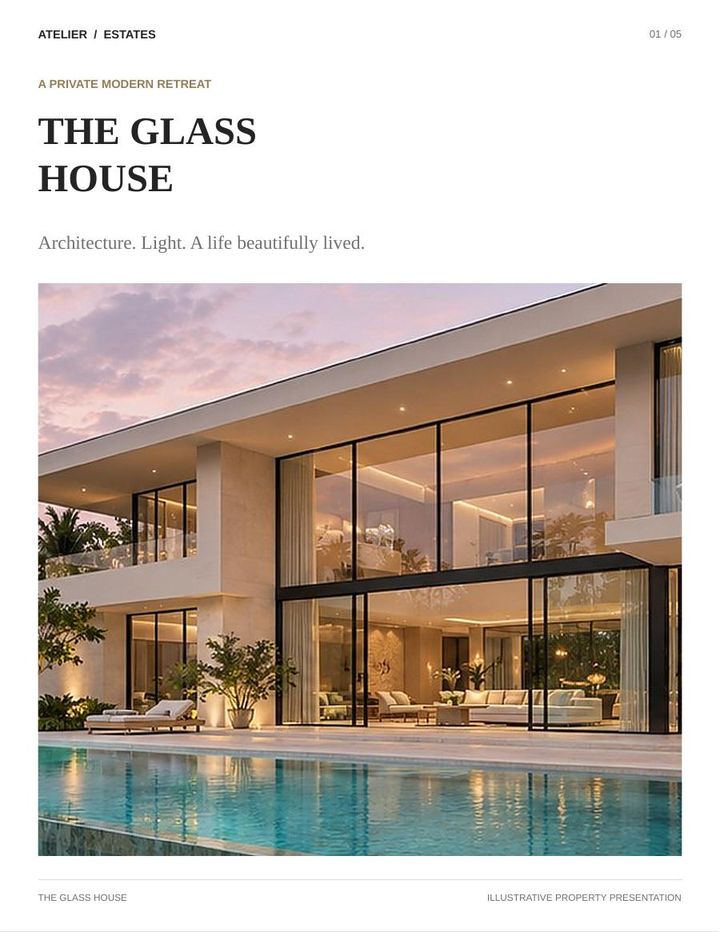
Fictional company. A luxury listing, room by room.

Fictional company. A collector's showcase.

Our own magazine, promoting one of our products.
Please note: the cars, the house and the companies in The Glass House and Classic Automobiles are fictional. They were created with AI to show what a FlipIt magazine can do. They do not exist, and any resemblance to a real vehicle, property or business is a coincidence.
Every product links to your checkout. Customers zoom in on the details.
Your slides as a magazine, with you on the cover saying hello.
A menu people flip on their phone, with a button to book a table.
Room by room, with a walk-through video behind the front-door photo.
Lessons that turn like pages, a short video in each module.
The gift everybody keeps opening, sent with one link.
Every stop on the map, with the view coming alive when they point at it.
Classes, teachers and events, with the principal welcoming every family.
Click a sofa to see every angle and color, then go straight to the store.
The engine starts when they point at the photo. Test-drive button on every page.
Close-ups that sparkle in pop-ups, and the ring turning in the light.
Models walk when you point at them. Click a look to see every piece and buy it.
Sample covers. More real examples coming soon.
Birthdays, weddings, baby's first year, family reunions. Grandma talks right from her photo with a "Happy birthday, sweetheart!", Dad tells the story of the trip, and the bride and groom thank their guests from the wedding page. Everyone keeps flipping to see who speaks next. A living memory you share with the whole family in one link.
You welcome buyers on the cover and walk them through the property: "This is the kitchen, fully renovated last year…" Add a happy seller's testimonial and a neighborhood tour. Buyers feel like they've already visited, and they keep reading until the last page. Every photo can link to the full listing or your booking calendar.
The salesperson presents each model right from its photo, points out the features and invites a test drive. A happy owner shares why they love their ride. The engine roars, the wheels turn, and the "Book a test drive" link is one tap away. You can add videos of the car or bike running or filmed from every angle.
Your tour guide greets readers on every destination: "Welcome to Lisbon! Let me show you my favorite spot…" Travelers share their best memories, and the hotel manager presents the rooms. You can show the pools, the beaches, anything interesting as a video. Readers travel before they've even booked, and every page can link to the booking.
The principal welcomes families on the cover, each teacher presents their class, and students tell their own story in testimonial videos. Parents and future students feel the school's energy before they visit, and the "Apply now" or "Book a tour" link is right there.
Your designer presents each collection and explains the materials and comfort, and happy customers show the sofa in their own living room. Every piece links to its product page. Customers picture it at home, then buy in one tap.
The jeweler presents each piece and the craftsmanship behind it, and a fiancé tells the story of the proposal ring. The diamond sparkles on the page. Every piece links to its page or to book a private viewing. Luxury deserves more than a flat photo.
Your stylist presents the collection and shows how to wear each look, and customers share how they feel in it. The outfit walks, the fabric flows. Every item links to its own product page, so shoppers go from "I love it!" to "Bought it!" in one tap.
Your expert explains each step of the routine right next to the product, and real customers share their results. Readers trust what they see and hear, and the "Buy Here" button is right there.
The chef presents the signature dishes, the baker shows how the cake is made, and happy guests share their favorite meal. Menus and catering brochures that make mouths water, with a link to reserve or order on every page.
The planner walks couples through each venue and package, and real couples share their big day. Couples fall in love with the place before they even visit.
The coach demonstrates each class and program, and members share their transformation. Readers feel the energy and join, with a "Sign up" link on every page.
You welcome your prospect personally, explain each product, and let real customers share their results. Prospects finish your presentation because you're right there talking to them, and the "Buy Here" button is waiting at the end.
Your sales rep presents the proposal, your experts explain the product, and clients share their success. Your client hears from you before your competitor even gets a reply.
You present your work and tell the story behind each piece, and clients share their experience. Portfolios that move and sell.
You walk readers through each before-and-after transformation, and homeowners share their joy. Show the dream, then show it came true.
The florist presents each bouquet and the meaning behind the flowers, and happy customers share their surprise moments. Perfect for holidays, Valentine's Day and Mother's Day, with every bouquet linked to its order page.
You perform right on the page, and fans and venues share their experience. Bookers hear you before they call you.
The people you help tell their own stories, volunteers share why they give their time, and your leader thanks your supporters. Emotion moves hearts and donations, and the "Donate" link is right there.
The CEO welcomes new employees, each department presents itself, and team members share what they love about working there. Welcome guides people actually read.
Download FlipIt and try every creation tool, including Magic Photos. When you’re ready to save or share your magazine, subscribe.
Plans for one person
Build your magazine with every feature. Free, inside the app.
Free to try
What’s included
The first 100 subscribers get every Pro feature and keep their founding price for as long as their subscription stays active.
/month, billed yearly ($228)
Save $59.88 (about 21%)
What’s included
Create it, save it, share it, publish it. Everything FlipIt does.
/month, billed yearly ($288)
Save $71.88 (about 20%)
What’s included
Everything in FlipIt Pro, plus the tools that capture leads and track your results.
/month, billed yearly ($312)
Save $72 (about 19%)
What’s included
For teams
Give up to five people FlipIt Pro, all on one invoice.
/month, billed yearly ($948)
Save $240 (about 20%)
What’s included
More people, a lower price per person.
/month, billed yearly ($1,548)
Save $360 (about 19%)
What’s included
Tell us how many people need FlipIt Pro, and we’ll put together a quote for your team.
A quote for your team
Book a callWhat’s included
Founding Pro and FlipIt Pro include the same features. VIP Pro adds the sign-up form and Google Analytics and Facebook/Meta Pixel. Team plans include everything in VIP Pro, with FlipIt Pro for multiple people. FlipIt runs on Windows computers.
One Pro subscription lets you create, save, publish and share your interactive magazines.
A PDF has to be downloaded and is hard to read on a phone. A FlipIt magazine opens instantly from a link, turns like a real magazine, keeps every link clickable, and can surprise readers with Magic Photos. People spend time with it instead of closing it.
No. If you can save a PDF, you can use FlipIt. A 1-minute tour and a built-in illustrated guide show you every step.
Yes. Save it as a PDF (one click), then drop it into FlipIt. Links and buttons you add in PowerPoint, Canva or Word before saving stay clickable in the magazine.
Yes. Your readers open the link in any browser. They zoom with two fingers, tap the Magic Photos, and every link works.
Yes. Download FlipIt and try every feature for free, Magic Photos included. No credit card needed.
Click Publish online, connect a free Netlify account once, choose the name in your link, and publish. Copy the link and send it anywhere: email, text, Facebook, ads, QR codes.
Yes. Make your changes and click Update. Your link stays exactly the same, so everyone you sent it to sees the new version.
Yes, you can unpublish it whenever you want. The guide in FlipIt shows you how.
A Windows 10 or Windows 11 PC to create your magazines. Your readers can use any device.
Anytime, from your account. No contract, no phone call.
Convert your PowerPoint, Canva, Word, InDesign or anything else into a PDF then drag it in.
The first page is the cover; the rest open as two-page spreads on computers and one page at a time on phones.
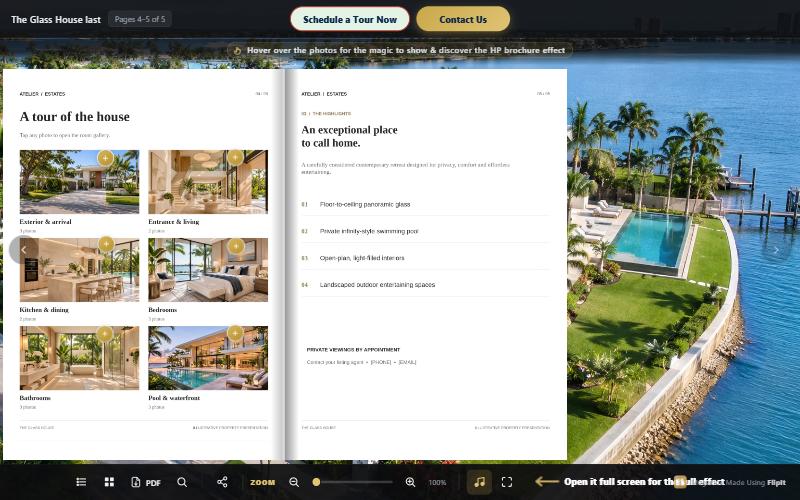
Pages render in high quality, so even small text stays crisp when readers zoom in.
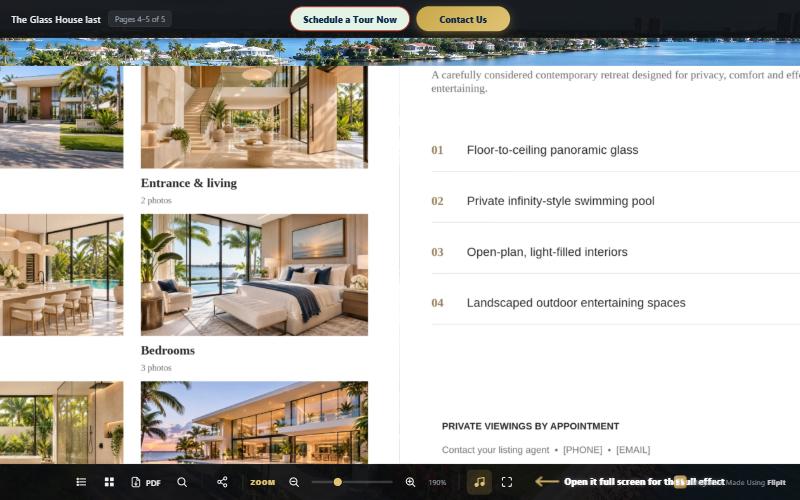
Portrait or landscape, matched automatically to your PDF.
Web, email, phone and page-to-page links already set up in your PDF keep working.
Inside FlipIt app, shows exactly what readers will see, updating as you work.
The “HP brochure effect”* makes a still photo come to life when readers hover over it or tap it on a phone.
Let your imagination run free. Whether you’re selling a product, presenting an idea, or sharing something you love, FlipIt gives you the tools to create a beautiful, entertaining magazine that keeps readers curious. Imagination is the only limit - we created this app so you have all the tools for that.
A still photo surprises readers by turning into a video or animation.
Hover or tap me● LiveThe video plays once without sound when readers hover over it. Click the sound button to restart it from the beginning with audio.
 Hover or tap me● Live
The video loops silently while readers hover over it. Choose “Always moving” to keep it looping endlessly.
 Hover or tap me● Live
Rotate the video frame from −45° to +45° to match the angle of your photo.
Resize the video box to fit your layout or choose “Show the full video”. You can also round the corners.
Leave a blank spot in your PDF, and FlipIt fills it with a still frame from your video.
Paste a YouTube or Vimeo link to play long videos right on the page and keep your magazine light and quick to load.
Use YouTube or Vimeo captions, upload your own .srt or .vtt file, or skip subtitles. Choose small, medium, or large text.
Use the small controls just above the subtitles to pause or mute the video.
FlipIt automatically compresses clips over 15 MB.
Drag to resize, use the arrow keys to fine-tune the position, and choose which still frame shows when the video is idle. Edit or remove the Magic Photo anytime.
*the Hover Photo effect
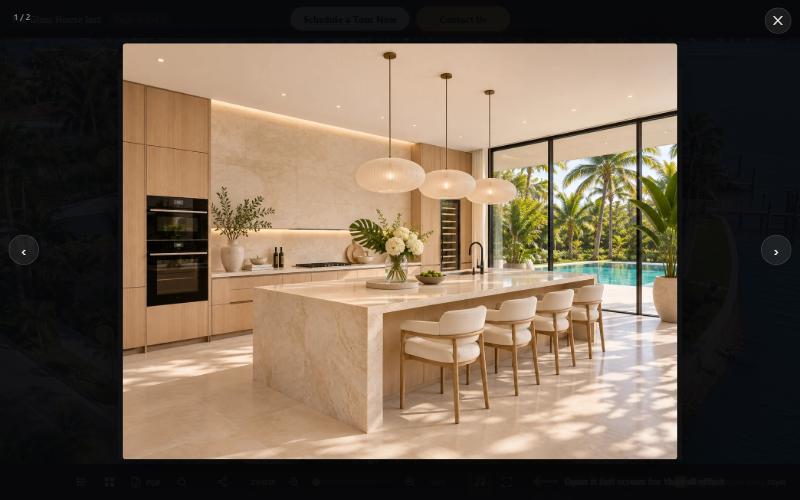
Add a + to any page. Readers click it to open a gallery and see larger photos. Showcase your inventory or add different views and details of whatever you’re presenting or selling. For a real estate magazine, place a + next to a room photo so readers can see more angles and close-up details. Add as many galleries as you like, with up to 12 photos per gallery. Drag the photos to reorder them.
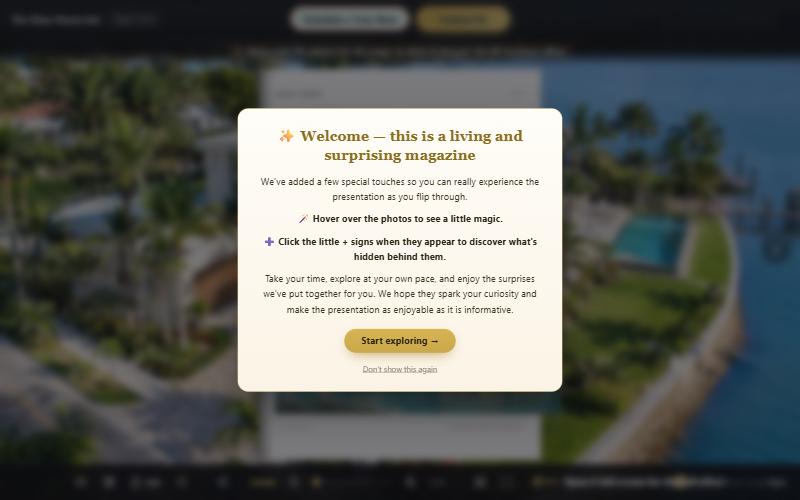
Write a custom message that appears in front of the magazine as soon as readers open it. You can also leave it off.
Add a round talking video to any page, or let your presenter guide readers through every page. Your presenter can be you, someone on your team, a specialist, an avatar, or anyone else you choose. Give the bubble a name, drag it into place, and resize it by dragging a corner. Choose the ring color and how the video starts playing.
A floating, shimmering banner reminds readers to hover over photos and see them come to life. Choose from three styles and decide which pages it appears on.
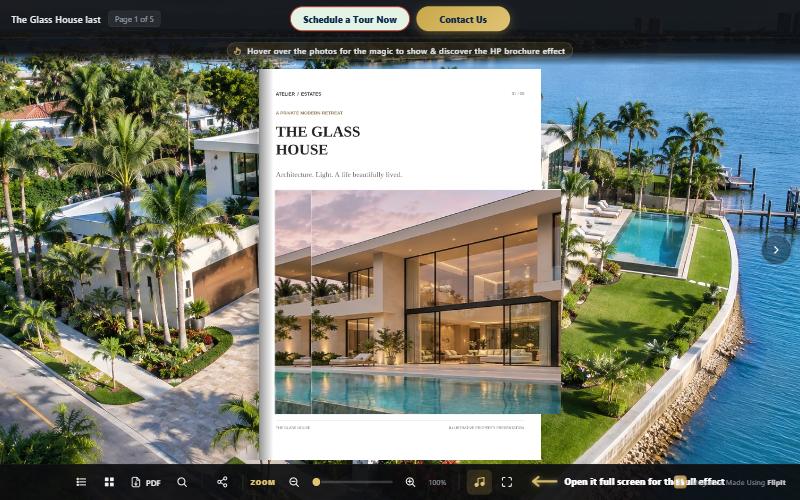
Add two buttons at the top of your magazine, each with its own label and link.
Any linked button, image, or text in your PDF stays clickable in the magazine.
Readers can open your original PDF at any time.
Choose a background color or texture, or upload your own image.
Music starts softly on the reader’s first click, plays on a loop, and pauses when a talking Magic Photo plays with sound. Readers can turn the music off at any time.
Place your logo in the top corner and link it to your website or shop.
Soften a busy background so your pages stand out.
Adjust the space around your magazine pages.
Pages curl and turn smoothly, like the pages of a printed magazine.
Enlarge the page to make small text easier to read.
The magazine automatically adapts to phones and tablets.
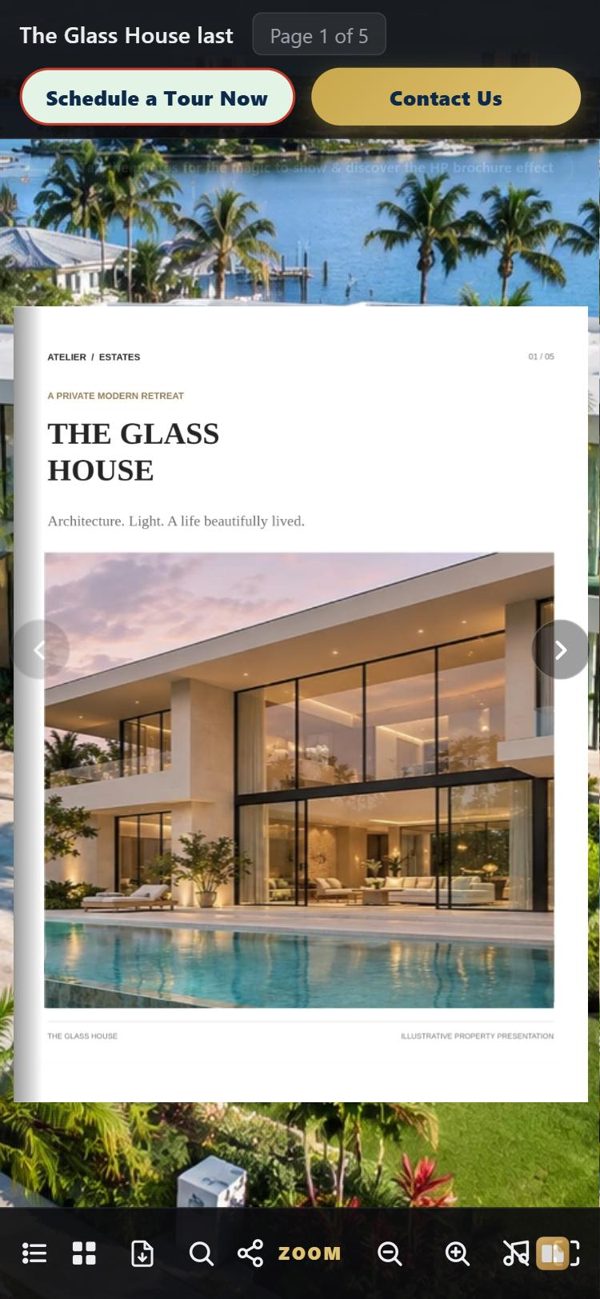
View the magazine in full screen with one click.
Readers just open the link. No app or sign-up is required.
FlipIt automatically keeps your last 40 projects, including all their settings.
Find step-by-step instructions for every feature.
When you first open FlipIt, a walkthrough shows you where to find each feature in the app.
Last updated: November 18, 2026
FlipIt is a Windows program by Frederica Rio Inc. (“we”, “us”), 100 Pierce Street, Clearwater, FL 33756, USA. By downloading or using FlipIt, or by buying a plan, you agree to these terms.
FlipIt turns your PDF into an interactive flip-through magazine. It runs on Windows computers.
We give you a personal, non-exclusive, non-transferable license to use FlipIt. Each paid plan comes with a license key. A key works on a limited number of computers: one for a one-person plan, and five or ten for the Small and Medium team plans. You may not share your key beyond your plan, copy or resell FlipIt, or try to get around the license check.
The magazines you make are yours. We do not claim any rights to them. You are responsible for what you put in them, including photos, videos, music and text. You promise that you have the right to use them and that they do not break the law or the rights of others. You are also responsible for how you share your magazines and for the website account where you publish them.
Do not use FlipIt to publish illegal, harmful or deceptive material, or to harm anyone’s computer or data.
We work hard to make FlipIt reliable, but it is provided “as is”. We do not promise that it will always work without errors or interruptions. Keep your own backups of your projects and original files.
To the fullest extent the law allows, we are not responsible for lost profits, lost data or indirect damages arising from using FlipIt. Our total responsibility to you is limited to the amount you paid us in the 12 months before the problem. Some places do not allow these limits, so they may not apply to you.
You can stop using FlipIt at any time. We may suspend a license that breaks these terms.
We may update these terms. The date at the top shows the latest version. If you keep using FlipIt after a change, you accept it.
These terms follow the laws of the State of Florida, USA. Questions: frederiquemollet@gmail.com.
Last updated: November 18, 2026
Frederica Rio Inc., 100 Pierce Street, Clearwater, FL 33756, USA, makes FlipIt. This page explains what information is used when you visit our website or use FlipIt.
Your PDFs, photos, videos, music and magazine projects are created and saved on your own computer. FlipIt never sends them to us, and we never see them. FlipIt does not track you or report how you use it. Its diagnostics log stays on your computer. Your magazine only goes online when you choose to publish it, to your own Netlify account. To check your subscription, FlipIt sends only your license key and an anonymous code for your computer to our payment provider.
When you publish a magazine, you choose where it goes, for example your own Netlify account. Anyone with the link can see a published magazine. When you add a YouTube or Vimeo video link, FlipIt asks YouTube or Vimeo for that video’s title, picture and subtitles, and only the link is sent. When the sign-up form is available, the sign-ups your readers enter go to your own Google Sheet, not to us. What you publish and who you share it with is your choice and your responsibility.
Some parts of our website, such as YouTube or Vimeo videos and our payment page, are provided by other companies. These companies may use their own cookies, under their own privacy policies, which we don’t control. Our website itself does not use cookies for tracking or advertising and does not run analytics at this time. If this changes, we will update this page.
To give you your license, check that your subscription is active, answer your questions, send you important notices about your account, and keep FlipIt working. We do not sell your personal information.
Only the services that help us run FlipIt, such as Dodo Payments for payments and taxes. Each has its own privacy policy. We may also share information if the law requires it.
We take reasonable care with the information we receive and choose partners who do the same. No method of sending or storing information is completely secure, so we cannot promise absolute security.
You can ask us to see, correct or delete the personal information we hold about you by writing to frederiquemollet@gmail.com. We will answer within a reasonable time. Some information must be kept by us or our payment partner for tax and legal reasons.
FlipIt is not meant for children under 13, and we do not knowingly collect their information.
We may update this policy. The date at the top shows the latest version. Questions: frederiquemollet@gmail.com.
Last updated: November 18, 2026
How refunds work for FlipIt subscriptions.
If FlipIt Pro is not right for you, ask for a refund within 14 days of your first payment, and we will refund it. After that, you can cancel anytime to stop future payments, but payments already made are not refunded, except where the law requires it. Renewals: a renewal can be refunded within 5 days. To ask, write to frederiquemollet@gmail.com with the email you used to buy.
Downloads and secure checkout are being connected now. Founding spots will be first come, first served.